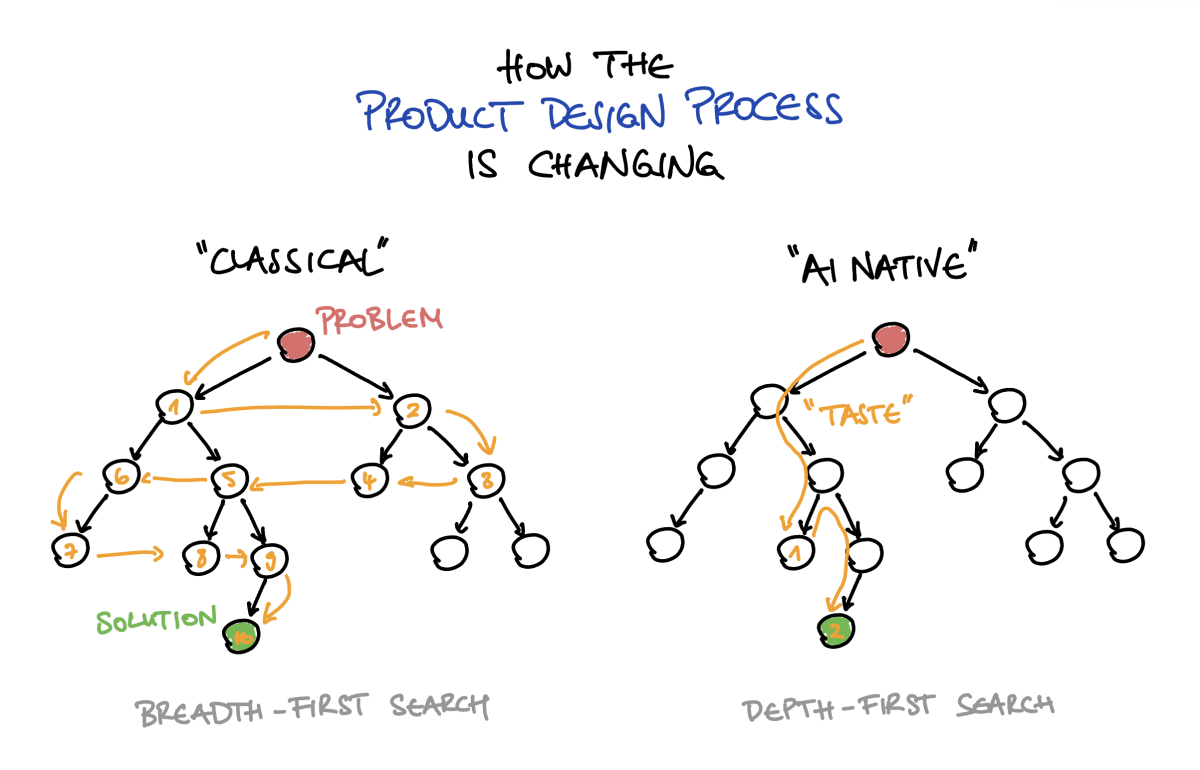
Taste and judgment have become the new buzzwords of the product world. Everyone agrees they matter more than ever, but I’ve rarely seen anyone define them precisely. So here’s my attempt, in computer science terms.
The classical product design process is a breadth-first search. You extensively map the problem space, interview a lot of users, explore many directions with low-fidelity prototypes, and only commit to one solution late. The process is deliberately systematic, which means it protects you from your own bad intuitions and biases by exploring the whole decision tree. It guides the search for you, at the cost of speed.
With AI, the process is becoming a depth-first search. Now you can go from a rough idea to a production-looking prototype in a few hours, effectively committing to one branch of the tree without ever having explored the others. Taste or judgment, then, is the ability to intuitively direct that depth-first search. It’s picking the right branch early, sensing when a path is a dead end, and knowing when to backtrack instead of digging deeper. Someone with great early judgment finds the solution in a fraction of the time. But if, and only if, their early decisions are right a lot more often than not.
The goal isn’t to skip the classical work. User research still matters, but I think that you can learn much faster from a working prototype than from an abstract discovery phase. Therefore, you can use the same activities in a more directed way and with a larger step size per iteration.
The danger is that every artifact generated with AI looks finished because it produces polished prototypes by default. Before, a prototype earned its polish through deliberate human effort, so its looks told you something about how well the underlying idea had been worked out. Because this signal is now gone, we have to communicate much more explicitly where in the design process a prototype sits.
I think the people who will thrive in the new process are product managers and designers who can also build, and experienced engineers with real product and business sense. Both can traverse the tree quickly, and most importantly, have the judgment to save a lot of time by being directionally right in many of their early decisions.
I have used MCP servers every now and then in the past, but they have never saved me much time. Last week, however, I got real value out of them for the first time, and I want to share what I learned.
Using an MCP integration as a “glorified form-filling tool” for a service that already offers a purpose-built UI can be useful, but in my experience, it doesn’t meaningfully increase productivity. Instead, the key insight was to use not one but two MCP servers, from entirely different systems that were never designed to communicate, and to use the LLM to connect them.
In my case, I used the Mixpanel and Notion MCP connectors, together with Claude, to build new analytics dashboards in Mixpanel, based on the extensive documentation I had previously written in Notion about our analytics and new onboarding flow. That documentation, together with the implementation tickets, gave Claude enough context to build exactly the dashboards I needed, from only a clear but high-level description of what I wanted. The resulting dashboards only required minimal manual adjustments from me.
I came to see that MCP integrations are not really about interacting with a server in natural language. They’re the piping that an LLM can use to connect or glue together deterministic systems that weren’t designed to talk to each other. And the more services you can wire together in a useful way, the more value they can provide.
For this reason, they are a great tool for prototyping and for producing any stateful output or asset that can be reviewed and refined before it is used or shared. However, I’m a lot less convinced they’ll be useful for building enterprise workflows that automate business processes and need to be robust. At least to date, MCP servers can easily have breaking changes, aren’t versioned, and so on. And the more MCP servers are involved, the more fragile any workflow becomes.
Lastly, my practical advice for the product engineers tasked with building an MCP server is not to think of it as a wrapper around your API, but to ask yourself how to build an interface for your service that is maximally useful when combined with any other existing service, to enable unique and custom use cases for the user.
From skeptic to true believer: How OpenClaw changed my life (Lenny’s Podcast). This is the podcast on OpenClaw I listened to this weekend after the Karpathy episode. I think I understood the appeal of a proactive system that works independently from the start, but I haven't bought into the hype so far. However, I feel that these two podcasts together have started changing my mind—not because of a single capability, but because of the apparent emergent behavior that arises once a Claw has context about you and access to real tools. Agents, as we typically think of them, are reactive: you give them a task, and they execute what they are asked to do. But I now fully realize that Claws are persistent and have personalities of their own. They run in the background, build up memory over time, check in on a schedule, and start acting on your behalf without being prompted.
Claire Vo, who was apparently a big OpenClaw skeptic when it launched, now manages nine agents across multiple Mac Minis for both personal and professional use.
The first thing that stood out to me in this conversation is how well the onboarding is apparently done. Instead of structured forms and settings pages, your Claw just asks you who it is and who you are, and you figure it out together through conversation, as if you hired a new employee. The second thing I learned is how well-crafted the default behavior of the Claw appears to be. The Claw's behavior emerges from some simple markdown files ("soul document"), but the defaults are apparently surprisingly thoughtful and lead to a really pleasant behavior. It sounds like this is something anyone working in product right now should experience firsthand.
I'm now genuinely intrigued to try it myself. To really get the full experience, you clearly need to run it on a separate machine, both for security and because you don't want to think about whether your laptop is online. I should really try setting one up on my Raspberry Pi, or just buy a Mac Mini for it. The other thing I don't really have yet is a clear use case for a Claw. I wonder whether I should try to come up with one before getting started, or whether this is something you just have to go for, because the onboarding seems good enough that the use case will emerge during the setup process.
Context Windows Are Limited by Atoms, Not Bits
There is a popular narrative in tech right now: AI progress is exponential, context windows will grow to infinity, and all vertical AI products will soon be replaced by general-purpose AI that can use all the context of your entire business. This implies that the big players like Anthropic, OpenAI, and Google, with their general-purpose agents like Claude Cowork, ChatGPT, or Gemini, will subsume all software.
[... 828 words]Boris Cherny (creator of Claude Code) on Lenny’s Podcast. I hadn't come across the term "latent demand" before this podcast, and Boris Cherny calls it the single most important principle in product. The idea of latent demand is to watch how users misuse or hack your product to solve their own use cases, and then build specifically for that. Cherny also extends this to AI. With AI products, you should observe what the model/agent is trying to do (e.g., which data it wants to access, which tools are missing, or it has to chain together that could be implemented in a use-case specific tool call), and make that easier.
Cherny also had an interesting comment on innovation. You can't force it, but you have to give people space and psychological safety to fail, but cut ideas that aren't working. Claude Code itself wasn't explicitly on the roadmap, and it wasn't an obvious hit at launch.
He also shared an interesting observation on how roles in and around product are changing with AI. Everyone on the Claude Code team—engineers, PMs, designers, etc.—codes, but with a different angle. He thinks the term "software engineer" might disappear by the end of the year and be replaced by something broader, like "builder".
This new screen aims to solve a rather obvious problem with all of the AI apps: what do you use them for? All of the options on this screen are achievable through a chat interface, but you need to know what to ask for, which is actually step 2 of the process: first you have to know what is possible, and most people don't. This screen aims to solve that: there are obvious filters you can use, and ideas for images you might want to create, like a Christmas card. Again, all of these are doable from a text interface, but there is a reason why purely text interfaces are the domain of so-called graybeards: it's not the typing that is the problem, or even knowing what to type: it's knowing what you could type.
[...]
To summarize, one role of product is to show you what you can do; another role is to inspire you to come up with more of your own ideas.
— Ben Thompson, Stratechery: ChatGPT Image 1.5; Apple v. Epic, Continued; Holiday Schedule
Strategy Letter IV: Bloatware and the 80/20 Myth. A great insight from Joel Spolsky in 2001 that still holds true today: 80% of users use only 20% of your product's features. The problem is that it's never the same 20%; everyone uses a different 20% of features.
A popular strategy for bootstrapping networks is what I like to call "come for the tool, stay for the network." The idea is to initially attract users with a single-player tool and then, over time, get them to participate in a network. The tool helps get to initial critical mass. The network creates the long term value for users, and defensibility for the company.
— Chris Dixon, Cited by Ben Thompson in his piece on Sora and Meta's disruption potential.